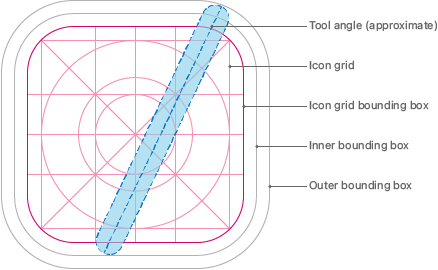
Apple's layout guidelines for app icons.
In computing, an icon is a small picture intended to represent something (a file, directory, or action) within a graphical user interface. When an icon is clicked on or tapped, some type of action is performed, such as launching software, opening a directory, or aborting a file transfer.
History
The term originates from Alan Kay's theory for designing interfaces which was primarily based on the work of Jerome Bruner. Bruner's second developmental stage, iconic, uses a system of representation that depends on visual or other sensory organization and upon the use of summarizing images.[1]
Usage
Icons are usually stored as bitmap images. Microsoft Windows uses a special bitmap format with file name extension ".ico" as well as embedding icons in executable (".exe") and dynamically-linked library (DLL) files. In classic Mac OS, icons were stored in the resource forks of files. As of macOS 11 "Big Sur", icons are stored in PNG format.
References
- ↑ icon at the Free On-Line Dictionary Of Computing. 2003-08-01.